
Getting Started with HR Essentials
HR Essentials is designed to help any organization better manage their HR resources and compliance. With online and on-call resources, HR Essentials offers on-demand access to online interactive training, practical HR resources expertise.
Review the guide below to assist you in getting clients started and setup with HR Essentials.
Step 1: Introductory Email to Client
Send an introductory email to your client to introduce them to the new resource and solution that you will be providing them. The email will come from someone within your organization and should also inform the client that a Welcome Email with their username and password will be coming shortly after.
Step 2: Setup Client from the Admin Site
Login to your admin site and setup the new client with access to the platform. Click here to read an article on how to add clients. Once you setup a new client, the client will receive a system generated welcome email that provides their login credentials to access the system.
Step 3: Enable Ask the HR Expert for the Client
From your admin site, enable Ask the HR Expert for your client which will provide them access to on-demand HR professionals. Click here to read an article on how to enable Ask the HR Expert.
Step 4: Set Permission Template for Client (optional)
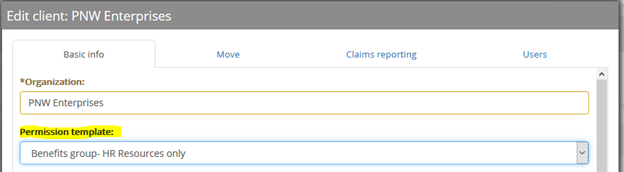
If you would like to limit your client’s access to only the HR resources within the risk management platform, select the HR/Benefits permission template from the client’s profile. You can set the default role for the client from your admin site, by selecting Clients from the navigation bar and then Manage Clients from the drop-down menu. Then search for and select the desired client’s name. From the Permission Template, drop-down menu, select the HR/Benefits template. If you do not see an HR/Benefits template, reach out to the Support team to have this created.
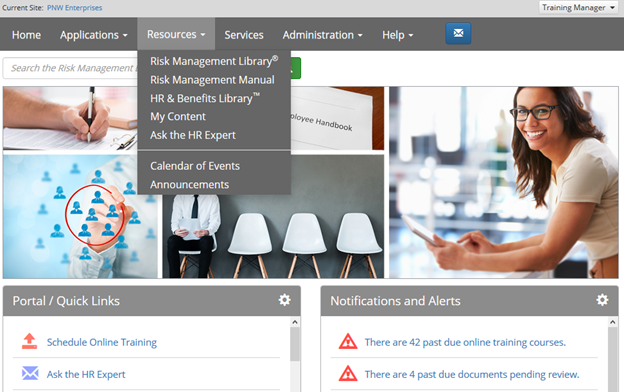
Your client now has access to HR Essentials! When your client logins to the platform, Ask the HR Expert is available in the Portal section on the home page. Ask the HR Expert and the HR Library are both available from the Resources menu.
Comments
0 comments
Please sign in to leave a comment.