
Create a client account | Import Multiple Clients

Create a client account
- Select Manage Clients from the Clients menu in the navigation bar
- Click the New button in the upper-right to add a new client
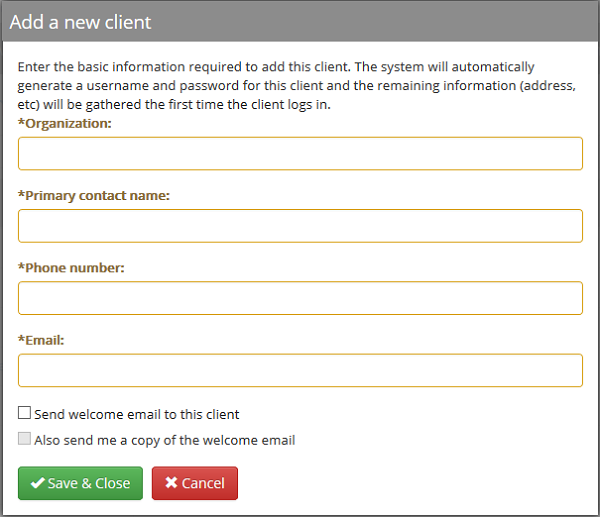
- Fill in the required fields with information regarding your client
- To send your client a welcome email that includes their username and password, check the box "Send welcome email to this client"
- If you would like to receive a copy of the welcome email, check the box "Also send me a copy of the welcome email"
- The main contact for your host group will be sent the copy
- Click the Save & Close button to save the entry
- The welcome email is sent immediately if you checked either option from step 3
Import Multiple Clients
- Select Manage Clients from the Clients menu in the navigation bar
- Click the Import button in the upper-right
- Click the Download... link to download the import spreadsheet template
- Follow the instructions in the import spreadsheet to enter client information
- Click the Select File button and browse to your saved import sheet
- Click the Import button to begin the process
- You will be informed of any errors that are encountered during the import process and can re-import the corrected spreadsheet to import any clients that were skipped due to errors
Comments
0 comments
Please sign in to leave a comment.